Here is a common data engineering setup: BigQuery for analytics, Apache Spark for pipelines, and Trino for ad hoc questions that land on a Friday afternoon. Each engine gets its own copy of the data, while sync jobs do their best to keep this data aligned.
Despite best efforts, data doesn't always stay consistent, and the lag between syncs inevitably becomes an issue. Consider a scenario where BigQuery says that an order status is shipped, while the Spark copy reports paid and awaiting shipment. No one can trust either until the next sync job finishes. Even if it eventually does finish, you're still paying for compute time to perform the sync and storage for multiple copies. And if it doesn't finish? You pay for engineering time to trace and fix the pipeline issues.
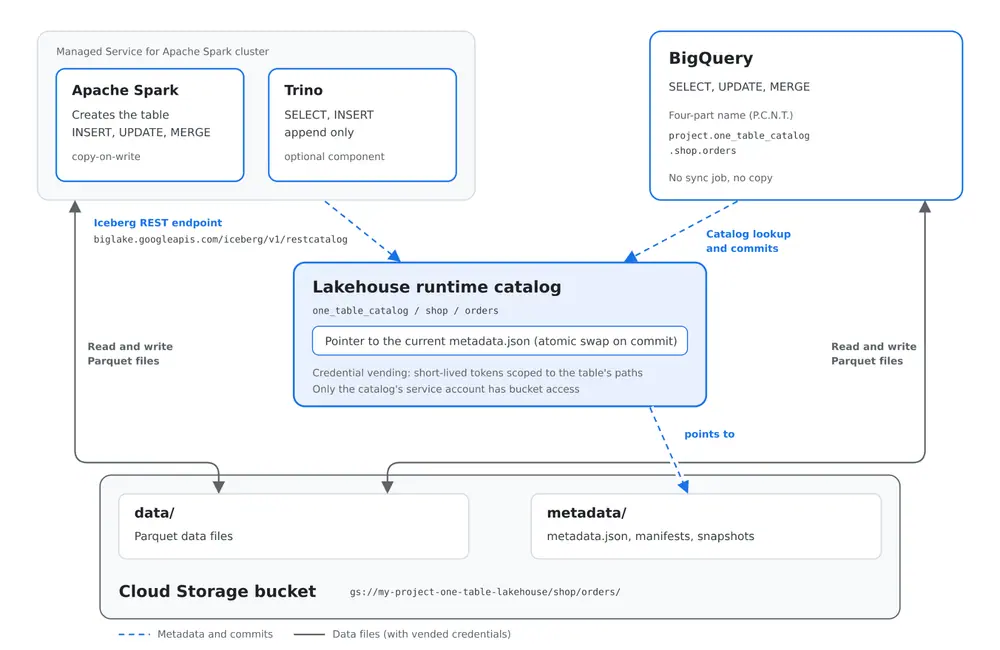
Google Cloud's borderless Lakehouse and the Apache Iceberg open table format work together to help solve this. Every engine can read the same Parquet files and the same metadata layout without having to create separate copies. A shared catalog and commit protocol ensure that the engines agree on where the current version of the table lives, and on how a change gets committed without one writer trampling another.
To test it out, I built a project of my own: one orders table, one Cloud Storage bucket registered once in the Lakehouse runtime catalog. Apache Spark creates and loads the table, Trino appends to it, and BigQuery updates and merges rows in place. Then I made Spark and Trino write at the same moment, on purpose, to see what Iceberg does when two commits collide.
I ran every command here in a fresh Google Cloud project, and I've reported the outputs as they came back. You can find the full set of scripts in this repository.
Architecture Overview: One Bucket, One Catalog, Three Engines
The mental model is small. Every data file and every metadata file for the table sits in one Cloud Storage location. The catalog doesn't hold any data. Instead, it holds one thing of great importance: a pointer to each table's current version via its metadata.json file. Change the pointer, and you've changed the table.
Spark and Trino reach the Lakehouse runtime catalog through the standard Apache Iceberg REST catalog endpoint (https://biglake.googleapis.com/iceberg/v1/restcatalog).
BigQuery doesn't need any connector setup. It reads the same table with a four-part name:
project.catalog.namespace.table
For this guide, the four-part name is:
my-project.one_table_catalog.shop.orders
This is referred to as the P.C.N.T. naming convention, for Project.Catalog.Namespace.Table, which parallels BigQuery dataset syntax.
The last design choice is who can access the bucket. The catalog supports two credential modes:
| Mode | Who needs bucket access | What the engine gets |
|---|---|---|
| End-user credentials | Every user and every job service account | Nothing extra; each caller uses its own identity against Cloud Storage |
| Credential vending mode | Only the catalog's own service account | A short-lived token scoped to the paths of the table being read or written |
I went with credential vending mode. With three engines and their service accounts in play, I'd rather grant bucket access to exactly one identity and manage everything else through catalog roles.
Step 1: Creating the Catalog and the Bucket
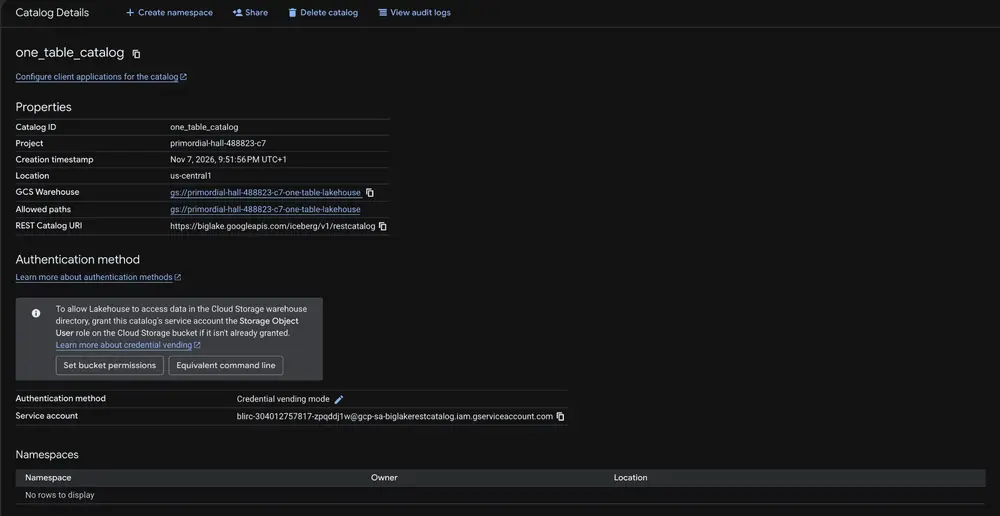
The bucket comes first. After that, the catalog is a single gcloud command.
export PROJECT_ID="my-project"
export REGION="us-central1"
export BUCKET_NAME="${PROJECT_ID}-one-table-lakehouse"
export CATALOG_ID="one_table_catalog"

gcloud storage buckets create gs://${BUCKET_NAME} \
  --project=${PROJECT_ID} \
  --location=${REGION} \
  --uniform-bucket-level-access

gcloud biglake iceberg catalogs create ${CATALOG_ID} \
  --project=${PROJECT_ID} \
  --catalog-type=biglake \
  --default-location=gs://${BUCKET_NAME} \
  --credential-mode=vended-credentials
The flag to watch is --catalog-type=biglake. That gives you a multiple-bucket catalog, whose name doesn't have to match a bucket and which can grow to more storage paths later.
The catalog gets its own service account. With credential vending mode, it's the only identity that needs to touch the bucket:
CATALOG_SA=$(gcloud biglake iceberg catalogs describe ${CATALOG_ID} \
  --project=${PROJECT_ID} \
  --format='value(biglake-service-account)')

gcloud storage buckets add-iam-policy-binding gs://${BUCKET_NAME} \
  --member="serviceAccount:${CATALOG_SA}" \
  --role="roles/storage.objectUser"
That service account is created asynchronously, so the grant can fail if you run it immediately after its creation. If so, wait 20 seconds and run it again. The repo's script retries on its own.
The describe output for my project came back with credential-mode: CREDENTIAL_MODE_VENDED_CREDENTIALS and catalog-type: CATALOG_TYPE_BIGLAKE. In your project, you can check both to verify.
Step 2: Creating and Loading the Table from Managed Service for Apache Spark
Spark is up first because I am using it to create the table, and the table's write settings need to exist from the first commit. Changing write modes on a table that other engines already write to is how you end up with a mix of file layouts you didn't plan for.
One cluster runs both engines. Trino is an optional component on the same Managed Service for Apache Spark cluster:
gcloud dataproc clusters create one-table-cluster \
  --project=${PROJECT_ID} --region=${REGION} --zone=${REGION}-a \
  --image-version=2.3-debian12 \
  --optional-components=ICEBERG,TRINO \
  --enable-component-gateway \
  --master-machine-type=n2-standard-4 --worker-machine-type=n2-standard-4 \
  --num-workers=2 \
  --properties="dataproc:dataproc.lakehouse.catalog.${CATALOG_ID}=projects/${PROJECT_ID}/catalogs/${CATALOG_ID}"
The cluster's default service account needs the following roles on the project:
roles/dataproc.workerroles/biglake.editorroles/serviceusage.serviceUsageConsumer
The cluster requires nothing on the bucket, because the catalog vends it a token.
That dataproc.lakehouse.catalog property wires Spark to the catalog in one line. It sets Spark's warehouse to gs://<bucket>. On older 2.3 image builds, it sets Spark warehouse to gs://BUCKET. With the Apache Iceberg REST catalog endpoint, a gs:// warehouse URI addresses a single-bucket catalog named after the bucket, so my first Spark run wrote the table into a single-bucket catalog that Lakehouse had quietly created, and BigQuery could not find it under my multiple-bucket catalog. A multiple-bucket catalog is addressed as bl://projects/PROJECT_ID/catalogs/CATALOG_ID. It was a quick fix to the warehouse on the master node once the cluster was up:
gcloud compute ssh one-table-cluster-m --zone=${REGION}-a --command="sudo sed -i \
  's#^spark.sql.catalog.${CATALOG_ID}.warehouse=.*#spark.sql.catalog.${CATALOG_ID}.warehouse=bl://projects/${PROJECT_ID}/catalogs/${CATALOG_ID}#' \
  /etc/spark/conf/spark-defaults.conf"
If gcloud biglake iceberg catalogs list shows a catalog of type CATALOG_TYPE_GCS_BUCKET that you never created, this is why.
Now the table. Spark SQL, submitted as a job:
CREATE NAMESPACE IF NOT EXISTS one_table_catalog.shop;
CREATE TABLE one_table_catalog.shop.orders (
  order_id     BIGINT,
  customer_id  BIGINT,
  status       STRING,
  amount       DECIMAL(10,2),
  updated_at   TIMESTAMP
)
USING iceberg
TBLPROPERTIES (
  'format-version'                   = '2',
  'write.delete.mode'                = 'copy-on-write',
  'write.update.mode'                = 'copy-on-write',
  'write.merge.mode'                 = 'copy-on-write',
  'gcp.biglake.bigquery-dml.enabled' = 'true'
);

INSERT INTO one_table_catalog.shop.orders VALUES
  (1001, 501, 'pending', 49.99,  TIMESTAMP '2026-11-01 09:15:00'),
  (1002, 502, 'paid',    120.00, TIMESTAMP '2026-11-01 10:42:00'),
  (1003, 501, 'shipped', 18.50,  TIMESTAMP '2026-11-01 11:05:00'),
  (1004, 503, 'pending', 75.25,  TIMESTAMP '2026-11-02 08:30:00'),
  (1005, 504, 'paid',    260.00, TIMESTAMP '2026-11-02 13:20:00');
gcloud dataproc jobs submit spark-sql --cluster=one-table-cluster --region=${REGION} \
  --file=sql/spark/01_create_and_load.sql
The three write.*.mode settings are the ones that matter. copy-on-write means an UPDATE, DELETE, or MERGE rewrites the affected data files instead of adding delete files beside them. BigQuery Data Manipulation Language (DML) (gcp.biglake.bigquery-dml.enabled = true) on these tables requires copy-on-write, and so does Google automatic table maintenance (gcp.biglake.table-management.enabled = true) for compaction and snapshot expiration. The last property switches on BigQuery writes, which are in Preview for Apache Iceberg tables in the Lakehouse runtime catalog.
The job finished in under 10 seconds of actual work. SHOW TBLPROPERTIES confirmed all three modes as copy-on-write, and five rows came back.
Step 3: Appending and Querying from Trino
Trino gets one job in this setup: read and append. It never updates or deletes rows. Open source Trino Iceberg connector writes row-level changes as merge-on-read, which means position delete files next to the data. Google BigQuery DML and automatic table maintenance require copy-on-write for DELETE, UPDATE, and MERGE. This means that row-level changes belong to Spark and BigQuery, and Trino sticks to INSERT and SELECT. For an orders table, that's a natural split anyway: new orders arrive as appends, status changes are upserts.
On a current image, Trino's catalog connection is meant to come straight from cluster creation flags, with no separate config step. The Apache Iceberg REST catalog endpoint setup guide lists them:
--optional-components=TRINO
--properties="trino-catalog:one_table_catalog.connector.name=iceberg,\
trino-catalog:one_table_catalog.iceberg.catalog.type=rest,\
trino-catalog:one_table_catalog.iceberg.rest-catalog.uri=https://biglake.googleapis.com/iceberg/v1/restcatalog,\
trino-catalog:one_table_catalog.iceberg.rest-catalog.warehouse=bl://projects/PROJECT_ID/catalogs/one_table_catalog,\
trino-catalog:one_table_catalog.iceberg.rest-catalog.biglake.project-id=PROJECT_ID,\
trino-catalog:one_table_catalog.iceberg.rest-catalog.rest.auth.type=org.apache.iceberg.gcp.auth.GoogleAuthManager"
Here's where my run hit a wall. The 2.3-debian12 image I used ships Trino 432 (SELECT node_version FROM system.runtime.nodes returns 432 on all three nodes), and its connector bundles Iceberg 1.4.1.
To finish the walkthrough on the image that's available today, I used a small compatibility shim, which is in the repo under trino_workaround/. It's under 100 lines of Python that listens on localhost:8181 on each node, adds the Google access token plus the x-goog-user-project and X-Iceberg-Access-Delegation headers the catalog requires, and forwards every request unchanged to biglake.googleapis.com. Responses, commit conflicts included, go straight back to Trino. Trino's catalog file then points at the shim:
connector.name=iceberg
iceberg.catalog.type=rest
iceberg.rest-catalog.uri=http://localhost:8181/iceberg/v1/restcatalog
iceberg.rest-catalog.warehouse=bl://projects/PROJECT_ID/catalogs/one_table_catalog
Trino 432 also can't use the vended storage token, so for this path the cluster's service account needs roles/storage.objectUser on the bucket. Treat all of this as a stopgap. On an image with Trino 481 or later, drop the shim and the extra bucket grant, and use the flags above.
With the catalog connected, Trino reads Spark's rows directly:
SELECT * FROM one_table_catalog.shop.orders ORDER BY order_id;

INSERT INTO one_table_catalog.shop.orders VALUES
  (1006, 505, 'pending', DECIMAL '42.00',  TIMESTAMP '2026-11-03 09:00:00 UTC'),
  (1007, 502, 'pending', DECIMAL '310.75', TIMESTAMP '2026-11-03 09:12:00 UTC'),
  (1008, 506, 'paid',    DECIMAL '64.10',  TIMESTAMP '2026-11-03 09:40:00 UTC');
Output:
order_id | customer_id | status  | amount |           updated_at
----------+-------------+---------+--------+--------------------------------
     1001 |         501 | pending |  49.99 | 2026-11-01 09:15:00.000000 UTC
     1002 |         502 | paid    | 120.00 | 2026-11-01 10:42:00.000000 UTC
     1003 |         501 | shipped |  18.50 | 2026-11-01 11:05:00.000000 UTC
     1004 |         503 | pending |  75.25 | 2026-11-02 08:30:00.000000 UTC
     1005 |         504 | paid    | 260.00 | 2026-11-02 13:20:00.000000 UTC
(5 rows)
INSERT: 3 rows
 status  | orders | total
---------+--------+--------
 paid    |      3 | 444.10
 pending |      4 | 477.99
 shipped |      1 |  18.50
(3 rows)
Step 4: Reading and Writing from BigQuery
BigQuery reads the table through the four-part P.C.N.T. name. No external table definition and no connection resource are needed, because the catalog in credential vending mode handles storage access:
SELECT order_id, customer_id, status, amount, updated_at
FROM `my-project.one_table_catalog.shop.orders`
ORDER BY order_id;
All eight rows came back, including the three Trino had appended a few minutes earlier. Then the writes: one UPDATE marks two orders as shipped, and one MERGE handles an upsert, touching an order Trino wrote and adding a new one:
UPDATE `my-project.one_table_catalog.shop.orders`
SET status = 'shipped', updated_at = CURRENT_TIMESTAMP()
WHERE order_id IN (1002, 1005);

MERGE `my-project.one_table_catalog.shop.orders` AS t
USING (
  SELECT 1006 AS order_id, 505 AS customer_id, 'paid' AS status, NUMERIC '42.00' AS amount
  UNION ALL
  SELECT 1009, 507, 'pending', NUMERIC '15.50'
) AS s
ON t.order_id = s.order_id
WHEN MATCHED THEN
  UPDATE SET status = s.status, updated_at = CURRENT_TIMESTAMP()
WHEN NOT MATCHED THEN
  INSERT (order_id, customer_id, status, amount, updated_at)
  VALUES (s.order_id, s.customer_id, s.status, s.amount, CURRENT_TIMESTAMP());
Each statement reported two affected rows and took about four seconds. BigQuery committed both directly to the shared Iceberg table, so there was nothing to sync. Trino's very next SELECT showed nine rows, with 1002 and 1005 shipped, 1006 paid, and 1009 added.
order_id | customer_id | status  | amount |           updated_at
----------+-------------+---------+--------+--------------------------------
     1001 |         501 | pending |  49.99 | 2026-11-01 09:15:00.000000 UTC
     1002 |         502 | shipped | 120.00 | 2026-11-07 22:41:22.391562 UTC
     1003 |         501 | shipped |  18.50 | 2026-11-01 11:05:00.000000 UTC
     1004 |         503 | pending |  75.25 | 2026-11-02 08:30:00.000000 UTC
     1005 |         504 | shipped | 260.00 | 2026-11-07 22:41:22.391562 UTC
     1006 |         505 | paid    |  42.00 | 2026-11-07 22:41:31.539636 UTC
     1007 |         502 | pending | 310.75 | 2026-11-03 09:12:00.000000 UTC
     1008 |         506 | paid    |  64.10 | 2026-11-03 09:40:00.000000 UTC
     1009 |         507 | pending |  15.50 | 2026-11-07 22:41:31.539636 UTC
(9 rows)
The table's snapshot history, read from Spark, is the best proof that three engines wrote to one table:
SELECT committed_at, snapshot_id, operation, summary
FROM one_table_catalog.shop.orders.snapshots
ORDER BY committed_at;
| Committed_at (UTC) | Operation | Written by | Records after |
|---|---|---|---|
| 21:47:26 | append | Spark (engine-name: spark) | 5 |
| 22:33:26 | append | Trino (trino_query_id in the summary) | 8 |
| 22:41:24 | overwrite | BigQuery UPDATE | 8 |
| 22:41:33 | overwrite | BigQuery MERGE | 9 |
Step 5: Concurrent Writes from Spark and Trino
Iceberg uses optimistic concurrency. Each writer reads the current metadata, writes its new data files and a new metadata file on its own, then asks the catalog to swap the table's pointer from the version it started with to the one it built. If another commit landed in between, the swap is refused. The writer then refreshes, checks whether its change still makes sense on top of the new version, and retries.
On Google Cloud, the Lakehouse runtime catalog applies strict conflict detection by default when BigQuery DML or automatic table maintenance is enabled. Any concurrent change to metadata.json, even one that touches different rows, makes the competing commit fail and retry. Commits are serialized per table, which is what gives readers snapshot isolation.
To force a collision, I started a Spark MERGE that moves every pending order to paid, padded with some deliberate busy work so it stays open for about 30 seconds. Twenty seconds in, while Spark was still working, Trino inserted two new pending orders. I ran three rounds, with a BigQuery SELECT polling the table every few seconds from a second terminal.
-- Spark (slow on purpose)
MERGE INTO one_table_catalog.shop.orders AS t
USING (
  SELECT o.order_id, 'paid' AS status
  FROM one_table_catalog.shop.orders o
  CROSS JOIN (SELECT MAX(id) AS m FROM range(0, 3000000000)) slow
  WHERE o.status = 'pending' AND slow.m > 0
) AS s
ON t.order_id = s.order_id
WHEN MATCHED THEN UPDATE SET t.status = s.status, t.updated_at = current_timestamp();

-- Trino, 20 seconds later
INSERT INTO one_table_catalog.shop.orders VALUES
  (2101, 610, 'pending', DECIMAL '22.00', current_timestamp),
  (2102, 611, 'pending', DECIMAL '58.40', current_timestamp);
The results surprised me. Trino won every round.
| Round | Trino INSERT committed (UTC) | Spark MERGE finished (UTC) | Outcome |
|---|---|---|---|
| 1 | 23:24:41 | 23:24:49 | Spark aborted |
| 2 | 23:25:19 | 23:25:30 | Spark aborted |
| 3 | 23:26:00 | 23:26:09 | Spark aborted |
Trino's append is quick, so it reached the catalog first. When Spark went to commit, Iceberg refreshed, found Trino's new data file and stopped:
org.apache.iceberg.exceptions.ValidationException: Found conflicting files that can
contain records matching true: [gs://.../shop/orders/.../data/20261107_232437_00009_...parquet]
  at org.apache.iceberg.util.Tasks$Builder.runTaskWithRetry(Tasks.java:413)
  at org.apache.iceberg.spark.source.SparkWrite$CopyOnWriteOperation.commitWithSerializableIsolation(...)
That's the proper behavior, and the proper result. Spark's MERGE runs with serializable isolation by default. It scanned the whole table (matching true means no filter narrowed the scan), so any new file could hold rows the MERGE should have seen. Trino's file did: two fresh pending orders.
I then switched the table's MERGE isolation to snapshot and ran one more round:
ALTER TABLE one_table_catalog.shop.orders
SET TBLPROPERTIES ('write.merge.isolation-level' = 'snapshot');
Trino committed at 23:35:31, and Spark finished cleanly ten seconds later. Under snapshot isolation, an append from another writer doesn't invalidate the MERGE, so Spark rebuilt its commit on top of Trino's version and the catalog accepted it. Both writes were committed. The trade-off is straightforward: rows appended after the MERGE scanned the table aren't part of that MERGE, so Trino's new orders stay pending until the next run picks them up. For an orders pipeline, that's usually fine.
The reader side was problem-free. BigQuery polled throughout the three serializable rounds:
23:24:39 total,pending,paid = 11,2,6
23:24:45 total,pending,paid = 13,4,6
23:25:27 total,pending,paid = 15,6,6
23:26:02 total,pending,paid = 17,8,6
Every result matched a committed snapshot, either just before a commit or just after it. Each jump of two rows lines up with a Trino commit, and paid never moved because no Spark MERGE got through. Not once did a query see a half-written state.
23:34:49 total,pending,paid = 17,8,6
23:34:55 total,pending,paid = 17,8,6
23:35:00 total,pending,paid = 17,8,6
23:35:06 total,pending,paid = 17,8,6
23:35:11 total,pending,paid = 17,8,6
23:35:17 total,pending,paid = 17,8,6
23:35:23 total,pending,paid = 17,8,6
23:35:28 total,pending,paid = 17,8,6
23:35:34 total,pending,paid = 19,10,6
23:35:39 total,pending,paid = 19,10,6
23:35:45 total,pending,paid = 19,2,14
23:35:50 total,pending,paid = 19,2,14
23:35:56 total,pending,paid = 19,2,14
23:36:01 total,pending,paid = 19,2,14
23:36:06 total,pending,paid = 19,2,14
23:36:12 total,pending,paid = 19,2,14
23:36:18 total,pending,paid = 19,2,14
23:36:23 total,pending,paid = 19,2,14
23:36:29 total,pending,paid = 19,2,14
23:36:34 total,pending,paid = 19,2,14
23:36:40 total,pending,paid = 19,2,14
23:36:46 total,pending,paid = 19,2,14
23:36:51 total,pending,paid = 19,2,14
23:36:57 total,pending,paid = 19,2,14
23:37:03 total,pending,paid = 19,2,14
23:37:08 total,pending,paid = 19,2,14
23:37:14 total,pending,paid = 19,2,14
23:37:20 total,pending,paid = 19,2,14
23:37:25 total,pending,paid = 19,2,14
23:37:30 total,pending,paid = 19,2,14
Conclusion
One Iceberg table, one bucket, one catalog. Spark created it, Trino appended to it, BigQuery updated and merged rows into it, and every engine saw every other engine's commits on the next query without a single sync job. When Spark and Trino collided, the table refused to lose data, and BigQuery readers never saw anything but whole snapshots.
If I were taking this to production, I'd focus on the following:
Choose isolation per table. Serializable isolation protected the MERGE from rows it never saw, which is exactly what you want for a balance or an inventory count. For status upserts against a table that other engines append to all day, snapshot isolation allows both writes to commit, which is the better choice for the case.
Narrow what a MERGE reads. Spark's conflict error filter (matching true) showed true because the MERGE scanned the entire table, so any new file could conflict. Partition by something like order date and add it to the MERGE condition, and a fresh append in today's partition stops blocking a MERGE on last week's.
Tune commit retries per table. Iceberg retries a refused pointer swap four times by default (commit.retry.num-retries), waiting between 100 ms and 60 s. That's plenty for a handful of writers. A table with streaming appends every few seconds and long MERGE jobs on top needs more retries and a longer commit.retry.total-timeout-ms, or the long jobs will keep losing.
Keep long rewrites away from busy appenders. A 30-second MERGE lost three times in a row to two-second inserts. In production, that's a scheduling question as much as a configuration one.
Finally, know when one table isn't the answer. An engine that must do row-level writes in a mode the table won't accept, like Trino's merge-on-read updates here, either stays read-and-append or gets its own copy. A team that needs hard isolation from another team's write load, or data that has to live in a different region, is better served by a copy with a clear owner.
The primary contributor to this article was Shittu Olumide.